
Platform
Frontpage Email: drafts, templates, series, sends, form confirmations, order receipts, the monthly Email sends allowance, CLI verbs, and the public v1 API.
MCP access
The existing Mail MCP tools use these shared draft, campaign, series and delivery services with separate CRM consent. Saving a draft does not send. Sending, enrollment and activation require explicit direction and the existing review checks. See the MCP setup and tool guide for availability, scope and disconnect.
Set up your email sender
In your site’s workspace, open Emails → Settings → Sender. These settings apply to that site.
- Set From to the business name customers should see.
- Set Reply-to to the mailbox where your team receives customer replies.
- Enter one complete Business postal address and save. Enter your complete business mailing address in your country’s format, including the street and building or registered PO box, city/locality, state/province/region and postal code where used, and country. You can use any language. This address appears in your marketing emails.
The address is one text field, up to 300 characters. Use your own valid address; for example, a complete US-format entry would look like 100 Example Street, Springfield, IL 62701, United States. This example is fictional. Saving does not verify whether mail can reach the address.
The Sender card beside a campaign or template shows the saved From name, Reply-to and postal address. Edit sender settings → opens Sender settings directly. When the address is missing, Add postal address → opens and focuses that field.
See the Sender card with a missing address
This screenshot uses sample business details.
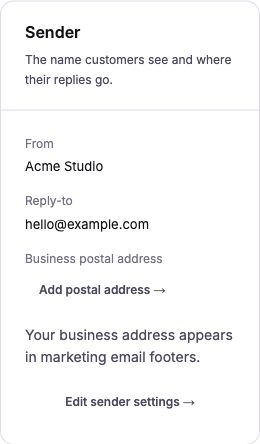
If you build your own workspace links, replace YOUR_SITE with the site’s subdomain slug:
https://app.frontpage.host/workspace/sites/YOUR_SITE/emails?tab=settings&focus=sender
https://app.frontpage.host/workspace/sites/YOUR_SITE/emails?tab=settings&focus=postal-address
These links require workspace access. The first opens Sender settings; the second focuses the address. When you follow the editor’s settings links, the current draft stays in that browser while you edit settings. Save settings, use your browser’s Back button to return to the editor, then test again. This draft preservation is local to that browser, not a shared saved draft.
Preview, test email, or purchase receipt?
A reusable template can serve different workflows. Choose the preview or test for the workflow you need:
| Action | What happens | Postal address |
|---|---|---|
| Campaign or template preview | Renders the marketing email without sending it. | A missing address appears as a placeholder in the marketing footer. |
Test to myself, Test email, or CLI --test | Sends a real marketing test. Workspace tests go only to your signed-in account email. CLI tests use the one recipient you supply. The subject starts with [TEST]; a sent test uses the Email sends allowance. | Required, including when you test a reusable template that is also attached to a purchase. |
| Offering receipt preview | Uses the saved Offering and purchase-receipt renderer. Sends no email, makes no charge and reads no customer record. | A missing marketing postal address does not block this preview. |
| Actual purchase receipt | The existing receipt job sends it after verified payment, using the purchase’s saved answers and attached template, or the standard receipt. | The marketing-send address check does not gate purchase receipts. Existing receipt delivery and allowance checks still apply. |
For a marketing test, open the draft or template and choose its test action. If the postal address is missing, the editor shows “Email not sent. Add your business postal address before sending marketing emails.” beside the action, with an Add business postal address → link to the field. No send is accepted for that validation error. Tests still follow the existing recipient, suppression, permission and allowance rules.
Saving an address does not resend a failed test. Return to the draft and start a new test once. A queued or provider-accepted send is not proof of inbox delivery; inspect its send status before retrying an uncertain result.
For CLI previews, replace the example IDs with IDs returned by your site. Neither command below sends email:
# Generic marketing template preview
frontpage mail template preview TEMPLATE_ID --site acme --json

# Attached purchase receipt for a standalone payment button (CLI 0.2.10+)
frontpage payments buttons receipt-preview OFFERING_ID --site acme --json
The receipt preview returns preview: true and receipt: "custom" with the rendered subject, html and text when a custom template is attached. Otherwise it returns receipt: "stock" with a message that verified purchases use the standard receipt. Read the Offering’s receiptVariables before supplying optional sample values. See the payment-button receipt walkthrough. Sending a template manually does not simulate a purchase or attach a receipt to a payment button.
Tested Email walkthroughs
Start with these copyable workflows, then use the reference for the full command and field list. Response excerpts come from tested calls; extra fields are omitted and IDs may be normalized.
Install npm i -g frontpage-host@latest, set FRONTPAGE_API_KEY on your server, and replace acme with your site slug. Site roles, CLI access, and product permissions still apply. Use IDs and versions returned by your own calls.
CLI --json wraps success in ok, command and data. HTTP returns the resource body directly.
On this page:
- Create and preview a reusable template
- Check recipients without sending
- Send once and check the result
- Attach content to the event that should send it
- Email reference
Create and preview a reusable template
Prerequisites: mail API entitlement and editor access to the site. A template is reusable content, not a campaign. Save welcome.json:
{
  "name": "Welcome",
  "subject": "Hello {{first_name}}",
  "preheader": "Your support team is here.",
  "blocks": [
    {
      "type": "paragraph",
      "text": "Thanks for joining us, {{first_name}}."
    }
  ]
}
frontpage mail template create --file welcome.json --site acme --json
{
  "ok": true,
  "command": "mail",
  "data": {
    "slug": "acme",
    "template": {
      "id": "b308e1e6-f4f1-41b0-94d7-b05aafc2d448",
      "kind": "template",
      "name": "Welcome",
      "subject": "Hello {{first_name}}",
      "preheader": "Your support team is here.",
      "variables": []
    }
  }
}
Use data.template.id, not its name, in later commands:
frontpage mail template preview "$TEMPLATE_ID" --site acme --json
{
  "ok": true,
  "command": "mail",
  "data": {
    "slug": "acme",
    "preview": {
      "subject": "Hello there",
      "preheader": "Your support team is here."
    }
  }
}
The full preview also returns rendered HTML and text. With no recipient context, first_name becomes there. Preview does not send, enrol a person, or consume an Email send. first_name and last_name are built in; declare other variable names in the template's variables array.
Check recipients without sending
Configure your real business postal address and reply address first. The address below is a test value; replace it:
frontpage mail settings set --postal "100 Example Street, Springfield, IL 62701, United States" --reply-to owner@example.com --timezone America/Chicago --site acme --json
Save this as check-email.json. dryRun is a JSON body field; there is no --dry-run flag:
{
  "subject": "Hello {{first_name}}",
  "preheader": "Your support team is here.",
  "blocks": [
    {
      "type": "paragraph",
      "text": "Thanks for joining us, {{first_name}}."
    }
  ],
  "dryRun": true
}
frontpage mail send --file check-email.json --to ada@example.com --name "Ada Lovelace" --site acme --json
{
  "ok": true,
  "command": "mail",
  "data": {
    "slug": "acme",
    "accepted": 1,
    "skipped": 0,
    "held": true,
    "sends": []
  }
}
The full body includes a batchId and enrolmentIds. Result: this example accepts one eligible address for the check and stores no send rows. Our test compared the send ledger before and after. held reflects the site's/platform's current hold state; it is not a delivery result. Eligibility, permission, suppression, configured sending and budgets still apply in a dry run.
The equivalent HTTP request includes recipients in JSON; CLI --to and --name build them for you:
curl --fail-with-body -X POST "https://app.frontpage.host/api/v1/sites/acme/mail/send" -H "Authorization: Bearer $FRONTPAGE_API_KEY" -H "Content-Type: application/json" --data-binary @check-email-api.json
{
  "subject": "Hello {{first_name}}",
  "preheader": "Your support team is here.",
  "blocks": [
    {
      "type": "paragraph",
      "text": "Thanks for joining us, {{first_name}}."
    }
  ],
  "recipients": [
    {
      "email": "ada@example.com",
      "name": "Ada Lovelace"
    }
  ],
  "dryRun": true
}
Save the JSON above as check-email-api.json. HTTP returns slug, batchId, accepted, skipped, enrolmentIds, held, and sends directly, without the CLI's ok/data wrapper.
Before configuration was available, our isolated check returned this actual failure shape:
{
  "ok": false,
  "command": "mail",
  "error": {
    "code": "unavailable",
    "message": "Mailings are not configured.",
    "httpStatus": 503,
    "exitCode": 2,
    "requestId": "a2644767-ea43-45ec-8e7c-1e316d3b374b"
  }
}
A 503 is not a sent email. Check service configuration instead of repeating a send. A missing business postal address returns 400 and must be corrected before sending.
Send once and check the result
After reviewing content and permission, send a saved template once:
frontpage mail send template "$TEMPLATE_ID" --to ada@example.com --name "Ada Lovelace" --wait --site acme --json
frontpage mail sends list --batch "$BATCH_ID" --site acme --json
frontpage mail sends get "$SEND_ID" --site acme --json
Use the returned batch and send IDs. pending/claimed is queued work; sent is provider acceptance; delivered comes from delivery events. bounced, complained, failed, and skipped need their own handling. A timeout is not permission to send again: read the batch/send ledger first. The basic one-off send is not a caller-keyed replay API. The commands above explain the live-send path; this documentation check used preview/dry-run, not a live delivery.
For one-off campaigns with People audiences, use the campaign workflow below and keep its --request-key stable on retries. For automated sequences, save templates and series steps, then enroll explicitly. An Off series records waiting people at step 1; turn it On only when ready to start sending. Creating a template or series alone sends nothing.
Attach content to the event that should send it
| Intent | Correct operation | Result |
|---|---|---|
| Confirm a form submission | frontpage modules forms set --instance start --confirm-template TEMPLATE_ID --site acme |
The next eligible submission renders that template from matching form field names. |
| Change Store buyer receipts | frontpage store settings set-receipt --template TEMPLATE_ID --site acme |
Future Store receipts use the selected template. |
| Change one Offering receipt | frontpage payments buttons update consultation --receipt-template-id TEMPLATE_ID --site acme |
Future payments for that Offering use the override. |
| Send a saved template now | frontpage mail send template TEMPLATE_ID --to ada@example.com --site acme |
Sends once; it does not configure a form or receipt. |
These are separate workflows. Test a form or checkout event on a fixture before relying on the attached template. Do not send a campaign merely to confirm a form. The full reference below lists supported tokens, roles, limits, campaign/series steps, suppression, and send states.
Email reference
Workspace saves and series enrollment
CLI 0.2.11 uses the same frontpage command and /api/v1 API. Use frontpage mail save --file save.json --site YOUR_SITE --json for one complete email and series save. It never activates a series, enrolls people or sends email.
When editing a shared template from a series, Save & return saves the template and all pending series edits, then returns fully saved. Save email & add step saves a new shared template, attaches one step and saves the entire pending series. Neither needs a second Save series. Back keeps unfinished work; a test does not finish either task.
{
  "requestKey": "a-stable-save-key",
  "document": {
    "kind": "template",
    "name": "Welcome",
    "subject": "Welcome",
    "preheader": "Your next step",
    "blocks": [
      {
        "type": "paragraph",
        "text": "Thanks for joining us."
      }
    ],
    "variables": []
  },
  "series": {
    "name": "Welcome series",
    "steps": []
  },
  "append": true,
  "delayMinutes": 1440
}
Read the latest record before editing. Existing campaigns and series need their id and expectedUpdatedAt from the latest get response. Templates use their stable id; each save adds a copy and the last save wins, without a stale-template conflict. Include the whole pending series name and steps. Use append:true only with a new template; omit it to edit an existing shared template. Retry the identical payload and requestKey after a lost response. A 409 keeps the draft intact and requires reading and reviewing the saved versions. complete:true confirms the full transaction. Name, subject, preview text and valid content are required.
Campaign audiences accept personIds, groupIds, stageIds, filters and normalized addresses. Save audience:null to clear a selection. Recipient-only changes can be saved. Saving never sends, creates a CRM person or grants consent; final send review checks permission again.
People can enroll while a saved series is Off. Enrollment saves immediately, with no second Save series. They wait at step 1 with no send, snapshot, later-step timer or send reservation. Turning On starts their first email and resumes started people at their next unsent step, retaining due dates. Later waits begin after successful provider acceptance. Off holds queued work before provider handoff; a send already handed to the provider may finish. Completed or cancelled people never restart. Series can send at any hour. Normal limits, sender setup and recipient restrictions still govern delivery.
frontpage mail people --sort newest --page 1 --site YOUR_SITE --json
frontpage mail people --q alex --source signup --availability eligible --sort name --site YOUR_SITE --json
frontpage mail people --selected PERSON_ID,OTHER_PERSON_ID --selected-only --site YOUR_SITE --json
frontpage mail sends list --q alex --status delivered --type series --page 1 --limit 20 --site YOUR_SITE --json
frontpage mail enrolments list --series SERIES_ID --q alex --offset 0 --limit 20 --site YOUR_SITE --json
The directory returns reasonCode: allowed, permission_missing, not_allowed, unsubscribed, delivery_restricted, or no_active_email. These distinguish missing permission from an unsubscribe or delivery block. Selecting a person never changes permission. Directory sorting uses the CRM added date. Sorts are newest, oldest and name. Source and availability filters cover the site-scoped directory. Reviewed CRM enrollment uses people workspace series.preview and series.enrol, with a stable request key per batch. Review reports exclusions and nullable remainingAllowance (null while Off). Lists include current enrolledCount and waitingCount, excluding completed/cancelled people from the current count.
Settings support replyTo, postalLine, fromName, timezone, hourlyCap and headerAlign. Use mail settings set --file settings.json; null clears replyTo, postalLine, fromName or hourlyCap. CLI flags include --header-align left|center|right and --hourly-cap 1..1000|null. Legacy window fields and flags remain accepted but no longer restrict sending. No CLI upgrade is needed for this server-side change. Reads, edits, cancellation, Off enrollment and turning Off do not require a working send meter.
Sent search, count and pages cover the full permitted history. Types are campaign, series, confirmation, template, test and inline. Use either cursor or numbered pages. createdAt is the queue time, not delivery time. Detail includes saved content, attempts, errors and source availability; brand and sender in its preview use current settings. Deleted sources retain history. Suppressions stop this site's marketing campaigns and series; removing one does not resubscribe anyone or restart a cancelled series.
The internal agent uses the same services through save_mail_editor, get_mail_people, get_mail_send, update_mail_series and the existing reviewed People operations. All eight settings and suppression removal are supported. Public endpoints add POST /sites/:slug/mail/save and GET or POST /sites/:slug/mail/people. The read-only POST accepts filters and selected IDs in a JSON body for large selections under /api/v1. Site roles, plan gates and send checks remain in force.
Campaign audiences and automated emails
Choose people, groups, stages, or a filtered People list, then write and send a one-off campaign here in Emails. Campaigns keep their own drafts; they do not start from a template. Automated group/stage emails use a saved template or series. See the People guide for complete CLI, API, and agent examples.
frontpage mail campaign preview --file audience.json --site demo --json
frontpage mail campaign audience --id DRAFT_ID --file audience.json --site demo --json
frontpage mail campaign send --id DRAFT_ID --request-key REQUEST_UUID --site demo --json
frontpage mail campaign get --id DRAFT_ID --site demo --json
The audience file contains an audience object with groupIds, stageIds, personIds, filters, or addresses; null clears the saved audience. Send freezes recipients and content, and retries reuse the request key. Delivery checks permission again and uses shared provider pacing and existing site/platform limits. Queued means accepted into the send queue. Inspect campaign get for sent, pending, failed, and skipped counts.
New owner-added and CSV-imported People contacts default to owner-asserted marketing permission; existing contact edits preserve saved decisions. People audiences require current permission. Explicit addresses outside People assert permission without creating a contact; addresses that match People must pass its eligibility check. Saved subscriber unsubscribe, refusal, hidden state and delivery restrictions still apply. A requested test can bypass missing permission but cannot reverse a saved block. See the shared permission policy and reviewed-repair examples.
What this is
Email is how a site writes to someone. It is a platform capability, like People or
Store. It is not a module and it is not a widget. Do not invent markup for a campaign. Do not
enable it through frontpage modules enable.
Two doors share one monthly allowance, labeled Email sends.
- Mailings (
frontpage mail) is campaigns: saved drafts, reusable templates, a series of those templates, one-off sends, the send ledger, enrolments, and the suppression list. Available on every plan. Each message carries a postal line and an unsubscribe link. - Triggered emails include form and mailing list confirmations, form and Booking notifications, and order receipts. These are available on every plan, including Free, subject to the site’s email allowance and the delivery checks for each message.
frontpage mail settings set --postal "100 Example Street, Springfield, IL 62701, United States" --reply-to you@example.com
frontpage mail template create --file welcome.json --name Welcome
frontpage mail series create --name Welcome
frontpage mail series steps set <series-id> --step template=<template-id>,delay=0
frontpage mail series activate <series-id>
frontpage mail send series <series-id> --to ada@example.com --var first_name=Ada
frontpage modules forms set --instance start --notify-email sales@example.com --confirm-template <template-id>
frontpage mail is in current frontpage-host. If the binary says
Unknown command: mail, upgrade with npm i -g frontpage-host@latest.
--confirm-template on forms requires frontpage-host 0.1.23 or later.
Older installs report that flag as unknown.
Why these are not the same command
Agents keep routing every email through one verb. They are siblings.
| Job | What it sends | Command | Plan |
|---|---|---|---|
| Campaigns and series | Drafts, templates, one-offs, and series steps, with postal line and unsubscribe | frontpage mail … | Every plan; site roles and scopes apply |
| Form confirmation | One template, or the fixed “We received your message” note, to the person who submitted | frontpage modules forms set --confirm-template or --confirm | Every plan, including Free. Uses the site’s monthly Email sends allowance. |
| Staff notify | Forms send submission notices. Mailing list sends a weekly signup summary. Booking sends business notifications. | Use --notify-email for Forms and Mailing list. Set the notification address in Booking settings. | Every plan, including Free. Form and Booking notifications use the site’s Email sends allowance. |
| Signup confirmation | A simple confirmation or a saved email template for a new subscriber. | Use modules signups set --confirm for the simple confirmation or modules config signups to select a template. | Every plan, including Free. Uses the site’s monthly Email sends allowance. |
| Order receipt | One buyer template, or the stock receipt. Owner “you got paid” stays | frontpage store settings set-receipt or Store settings in the editor | Every plan (Stripe setup required for payments) |
| People | People selects audiences and starts automations; Email handles delivery | frontpage people … | Every plan; site roles and scopes apply |
| Form submissions (legacy inbox) | Nothing. The raw ledger | frontpage inbox … | Site membership and CLI/API access |
- A form confirmation is not a campaign. Do not enrol the submitter from
mail sendto “confirm” a form. - Choosing a template on a form does not start a series. A series is not attached to a form or an order.
- Login codes, team invites, and Frontpage billing mail are not this feature and do not count.
AI Support Agent is the separate conversational support product for chat and email. Use its scoped reply, guidance and identity flows rather than marketing sends.
Who can send
| Plan | Email sends / month | Templates, form confirmation, order receipt | frontpage mail |
|---|---|---|---|
| Free | 250 | Templates, campaigns, series and eligible confirmations are available in the workspace. Store is also available on every plan. | Available; site roles and scopes apply |
| Starter | 2,500 | Templates, campaigns, series and eligible confirmations are available in the workspace. | Available; site roles and scopes apply |
| Growth | 10,000 | Yes; campaigns and series in the workspace | Yes; site roles and scopes apply |
| Scale | 25,000 | Yes | Yes |
| Enterprise | 25,000 | Yes | Yes |
On a plan that includes frontpage mail, the key still has to be a member of
--site. Viewer can list and get. Editor and admin can create, send, and delete.
A viewer mutate is HTTP 403. A key that is not a member gets HTTP 404
Site not found. Same fence as People and
Store. See Isolation & keys.
-
--siteis a subdomain slug (acme). Not a custom domain, notacme.frontpage.host, not a site UUID. Resolution order is the same as People: this command’s--site, then.frontpage/state.jsonfromfrontpage use, then exit 2. - There is not a second campaign allowance. Campaign recipients and series steps draw from Email sends.
- At the month’s allowance the form still saves the submission. The confirmation and the staff email are skipped until the month resets. A campaign send returns 429
This month's email sends are used.There is no grace past 100%. - Changing plans preserves templates, campaigns and schedules. Future sends use the new plan allowance and existing delivery checks.
Settings
On a site without saved sender details, Workspace → Emails opens setup before its section tabs. Choose Set up emails, enter a reply-to email and full business postal address including country, then choose Save & finish setup. Sender name is optional. Replies go to the reply-to address; the postal address appears in the footer for common anti-spam requirements. Setup sends nothing. A successful save opens Campaigns. Later changes stay in Settings. CLI settings commands use the same saved fields and permissions. Marketing sends still require a postal address. Timezone is an IANA zone and defaults to UTC.
frontpage mail settings
frontpage mail settings get
frontpage mail settings set --postal "100 Example Street, Springfield, IL 62701, United States" --reply-to you@example.com --from-name "Acme" --timezone America/Chicago| Flag | API field | Rule |
|---|---|---|
--postal or --postal-line | postalLine | Required before a campaign sends. Trimmed, max 300 characters. Empty clears it |
--reply-to | replyTo | A valid email, or empty to clear. Invalid non-empty is 400 Reply-to must be a valid email address. |
--from-name | fromName | Max 100 characters. Empty clears it |
--timezone | timezone | IANA zone, e.g. America/Chicago. Anything else is 400 Timezone must be a valid IANA zone. |
Only flags you pass are patched. Human output of settings get is
timezone postal reply-to on one line.
Series can send at any hour. hourlyCap is an integer from 1 to 1000, or null to use the default
pace of 100 campaign sends an hour. That pace is not the monthly Email sends allowance.
Form confirmations and order receipts keep their existing delivery rules.
Drafts and templates
A draft (mail email) is one unsent email. A
template (mail template) is reusable: series steps point at
templates, and a form or a store receipt can point at one template. The verbs are the same.
frontpage mail email list
frontpage mail email get <id>
frontpage mail email create --file draft.json --name Hours
frontpage mail email set <id> --subject "We are open"
frontpage mail email preview <id>
frontpage mail email rm <id>

frontpage mail template list --q welcome --limit 50
frontpage mail template get <id>
frontpage mail template create --file welcome.json
frontpage mail template set <id> --file welcome.json
frontpage mail template preview <id>
frontpage mail template rm <id>
email listis unsent drafts only. A sent one-off leaves that list. Read it withmail sends list.- List flags:
--q(name or subject),--limit(1–200, default 50),--cursor(opaque, from the previous page’snextCursor). Do not invent a cursor. - Create requires
--file, a JSON object.--name,--subject, and--preheaderoverride the file. The file must still includeblocks, and on create it must include name, subject, and preview text unless those flags supply them. setpatches only the keys you pass.--fileis optional on set.- The id is a UUID from
listorcreate. Positional, or--id. A non-UUID is rejected locally. A UUID from another site is 404Document not found. - Caps: 50 unsent drafts per site, 50 live templates per site. Past that, create fails with the cap message.
- Name max 120. Subject max 200. Preview text (
preheader) max 200 and required. Empty name, subject, or preview text is 400. rmis a soft delete. A template still used by a series is 409This template is used by a series.A template still chosen on a form is 409 and names those forms. Remove it from the form first. A sent draft cannot be edited:A sent email cannot be edited. Duplicate it into a new draft.previewcompiles the saved document and prints the subject. It does not send and does not count.
The JSON file
Blocks are structured. Owner HTML is stripped. A token looks like
{{first_name}}. Declare every token you wrote, except the three built-ins
first_name, last_name and unsubscribe_url. A token that is not declared is
rejected on save: Unknown template variable: ….
{
  "name": "Welcome",
  "subject": "Hello {{first_name}}",
  "preheader": "You are on the list",
  "variables": ["organization_name"],
  "blocks": [
    { "type": "heading", "level": 1, "text": "Welcome" },
    { "type": "paragraph", "text": "Thanks from {{organization_name}}. See [the site](https://example.com)." },
    { "type": "button", "label": "Visit", "href": "https://example.com" },
    { "type": "image", "src": "https://example.com/logo.png", "alt": "Logo" },
    { "type": "divider" },
    { "type": "list", "style": "bullet", "items": ["One", "Two"] }
  ]
}| Block | Required | Notes |
|---|---|---|
heading | level 1 or 2, text | Optional align: left, center, right |
paragraph | text |
A small subset: **bold**, *italic*, and
[label](https://…). Links must be http, https, or mailto |
button | label, href | href must start with http:, https:, or mailto: |
image | src, alt |
PNG, JPEG, or WebP on https, or a site upload path
/__media/uploads/…. At most 10 images. Optional width and
height from 16 to 1600. Every image needs a label
|
divider | none | |
list | style bullet or number, items | At least one non-empty item |
Variable names are lowercase, start with a letter, and then letters, digits, _, or
-, up to 64 characters. Organization Name is rejected:
Variable names must be kebab or snake case. A block of text over 50,000 characters
is rejected. An empty blocks array is Add at least one content block.
What a token fills
The same template document fills differently depending on which door sends it.
| Door | What fills the tokens | Footer |
|---|---|---|
Campaign or series (mail send) | --var key=value on that recipient, plus {{first_name}} from
the recipient name (first word) or from --var first_name=. An empty first
name becomes there. {{unsubscribe_url}} is the unsubscribe link
| Postal line, unsubscribe, “Sent by {brand} via Frontpage” |
| Form confirmation |
Each token must equal an input name on that form.
{{organization_name}} fills only when the form has
name="organization_name". A token the form does not have is left blank. The
message still sends. The visitor address is a field the form already collects, usually
name="email". If Frontpage cannot tell which field is the address, it does
not send the confirmation. The submission is still saved
| None. Replies go to the form’s notify email. Brand is Brand settings |
| Order receipt | {{buyer_name}}, {{buyer_email}},
{{total}}, {{currency}},
{{items}}. Any other token is left blank. The message still sends
| None. Replies go to the site owner |
Form confirmation
One form uses one choice. Off sends nothing to the visitor. Simple confirmation sends the fixed “We received your message” email. A template sends only that template. The staff email is separate and is not a template.
frontpage modules forms get --instance start
frontpage modules forms set --instance start --notify-email sales@example.com --confirm-template <template-id>
frontpage modules forms set --instance start --confirm yes
frontpage modules forms set --instance start --confirm-template=--instanceis the form slug, the same value asdata-fp-form. Required on set. Do not targetdefault.--confirm-template <id>attaches that template.--confirm-template=clears it and leaves the simple confirmation alone.--confirm yesor--confirm nois the fixed confirmation. It is not a template. Booking and signups reject--confirm-template.- Human output prints a
templateline when a template id is set. - Free sites can send simple confirmations and saved templates within their monthly Email sends allowance. Frontpage still saves the submission when the site runs out of sends.
<form data-fp-form="start">
  <input name="organization_name" />
  <input name="fundraiser_name" />
  <input type="email" name="email" />
</form>
A template for that form declares organization_name, fundraiser_name,
and email, and uses those tokens. Nothing else.
Mailing list confirmations
Choose a simple confirmation or a saved email template. See the Modules guide for the commands to switch between them or turn confirmations off. For reservation emails, see Booking settings.
Order receipt
On Store settings, Buyer receipt is either the stock receipt or one saved template.
frontpage store settings set-receipt --template TEMPLATE_ID selects a saved template;
frontpage store settings set-receipt --stock restores the stock receipt.
The editor and manage_store expose the same setting.
Declare buyer_name, buyer_email, total,
currency, and items. The buyer receipt and the owner “you got paid”
mail both count toward Email sends. With no template, the stock receipt stays and still counts.
A series is not attached to an order. Catalog commands are on
Store.
Series
A series is an ordered list of templates. You enrol people into it. Each step is one send.
The first step becomes ready immediately. Later steps keep their configured delay
after the previous successful send. Sending has no automatic hours restriction. Campaigns
keep their saved schedules; normal sending checks and limits still apply.
frontpage mail series list
frontpage mail series create --name Welcome
frontpage mail series get <id>
frontpage mail series set <id> --name "Welcome sequence"
frontpage mail series set <id> --status paused
frontpage mail series activate <id>
frontpage mail series pause <id>
frontpage mail series steps set <id> --step template=<id>,delay=0 --step template=<id>,delay=2d
frontpage mail series steps set <id> --file steps.json
frontpage mail series rm <id>- Status is
draft,active, orpaused.activateandpauseare those two writes.set --statusaccepts all three. If you pass both--nameand--status, both fields save. The workspace shows active as On and draft/paused as Off; new series start On. Existing series keep their saved state when edited. Creating a series does not enroll anyone or send email. - Save at least one valid email step before enrolling anyone. Turning an existing Off series On also requires saved steps. An Off series with saved steps accepts enrollment and holds people at step 1 until it is turned On. The editor and progress view show an Off warning, even with no people enrolled. Turn it On to start waiting people and resume remaining emails at their next unsent step; normal delivery checks still apply.
- At most 25 live series per site. At most 12 steps. Each step must point at a template, not a draft.
- The first step’s delay is always 0. A non-zero first delay is
The first series step always sends immediately. -
Delay is minutes, or a duration:
30m,2h,2d. In JSON,delayMinutes,delay, ordelayDays. Max one year.steps.jsonis either{ "steps": [ … ] }or a bare array. - Replacing steps does not unsend mail already delivered. People still in the series move to whatever step is now next. If no step remains, that enrolment completes.
- A series is not attached to a form or an order. Enrolment is
mail send series.
{
  "steps": [
    { "templateId": "11111111-1111-1111-1111-111111111111", "delayMinutes": 0 },
    { "templateId": "22222222-2222-2222-2222-222222222222", "delay": "2d" }
  ]
}
Send
Four ways. Each needs at least one --to. One request accepts at most 200
recipients. Duplicate addresses in that request are dropped. Suppressed addresses are skipped
and do not count as accepted.
frontpage mail send --file email.json --to ada@example.com --to grace@example.com --wait
frontpage mail send email <draft-id> --to ada@example.com --name "Ada Lovelace" --var first_name=Ada
frontpage mail send template <template-id> --to ada@example.com --test
frontpage mail send series <series-id> --to ada@example.com,grace@example.com| Form | What is sent |
|---|---|
send --file email.json --to … | An inline one-off. Nothing is saved as a draft. The file supplies subject, preview text, and blocks. --to supplies recipients |
send email <id> --to … | That saved draft |
send template <id> --to … | That template, once, to those people. This does not attach it to a form |
send series <id> --to … | Enrols those people. The series must have saved steps. Off records waiting enrollment; On starts step 1 subject to normal checks |
--torepeats, or one flag with commas.--nameis applied to every recipient in that command.--var key=valuerepeats and is applied to every recipient. Per-recipient vars are the API body, not a CLI flag.--testis one recipient. It counts as one Email send. It does not require--wait; a test waits for the result.--waitwaits up to 30 seconds for that batch. Without it, the command prints the batch id and returns while rows are still queued.- Human output prints the batch id, or
Queued. - A missing postal line rejects a marketing send with 400
A postal address is required before sending.No send rows are accepted. - There is no
--dry-runflag. The API accepts"dryRun": true, which returnsaccepted,skipped, andheldand writes no rows.
Sends, enrolments, suppress
frontpage mail sends list
frontpage mail sends list --batch <batch-id> --limit 50
frontpage mail sends get <send-id>

frontpage mail enrolments list
frontpage mail enrolments list --series <series-id>
frontpage mail enrolments cancel <enrolment-id>

frontpage mail suppress list
frontpage mail suppress add --email bounce@example.com
frontpage mail suppress rm --email bounce@example.com-
A send row status is
pending,claimed,sent,skipped,failed,delivered,bounced, orcomplained. Human list output isid status email. - An enrolment status is
active,paused,completed, orcancelled.cancelstops the rest of that series for that person. Mail already sent stays sent. -
suppress addrecords reasonmanualand cancels active enrolments for that address on this site. Later sends to that address are skipped. Reasonsunsubscribed,bounced, andcomplainedare written by the platform, not by this command.suppress rmremoves the row. It does not restart a cancelled enrolment. Adding the same address again returns the existing row. - Suppression is per site. The same address on another site is a different row.
CLI map
Unknown leftover flags fail closed (exit 2). Global flags:
--site / -s / --site=, --json,
--quiet. See Flags.
| Command | Role | What it does |
|---|---|---|
mail settings / settings get | viewer | Read postal, reply-to, from-name, timezone, hourly cap |
mail settings set | editor | Patch the flags you pass |
mail email list|get | viewer | Unsent drafts |
mail email create|set|rm | editor | Draft write and soft-delete |
mail email preview | viewer | Compile a draft. Does not send |
mail template list|get | viewer | Templates |
mail template create|set|rm | editor | Template write. Delete refuses a series or a form that still points at it |
mail template preview | viewer | Compile a template. Does not send |
mail series list|get | viewer | Series and their steps |
mail series create|set|rm|activate|pause | editor | Series write. Activate needs at least one step |
mail series steps set | editor | Replace the step list |
mail send | editor | Queue an inline message, a draft, a template, or a series enrolment |
mail sends list|get | viewer | The send ledger |
mail enrolments list | viewer | Who is in a series |
mail enrolments cancel | editor | Stop the rest of that enrolment |
mail suppress list | viewer | Addresses that will not be mailed |
mail suppress add|rm | editor | Manual suppression |
modules forms set --confirm-template | editor | Attach one template to one form. Not part of mail |
modules forms set --confirm | editor | Fixed confirmation on or off |
modules forms|signups|booking set --notify-email | editor | Staff address. Not a template |
modules signups set --confirm | editor | Fixed signup confirmation. Not a template |
There is no mail confirm, no mail receipt, no
mail people, and no receipt send command. Attach Store templates with frontpage store settings set-receipt and Offering templates with frontpage payments buttons update --receipt-template-id. Templates can be edited in the workspace or through frontpage mail on every plan.
Public v1 API
Base: https://app.frontpage.host/.
Same key as every other public CLI call. CLI/API access is available on every plan.
Campaigns and series are available in the workspace on every plan. Viewer for reads, editor for writes.
Reads are RL-READ. Writes are RL-WRITE-LIGHT. See
Rate limits.
Cookie routes under the signed-in editor are not this API. Do not call those from a script.
HTTP success returns the resource fields below directly, next to slug.
The CLI wraps that body in ok, command, and data.
| Method | Path | Role | Returns |
|---|---|---|---|
| GET | /settings | viewer | settings |
| PATCH | /settings | editor | settings. Audit site.mailings.settings.set |
| GET | /emails | viewer | emails, nextCursor. Query q, limit, cursor, includeSent=1 |
| POST | /emails | editor | 201 email. Audit site.mailings.email.create |
| GET | /emails/:id | viewer | email |
| PATCH | /emails/:id | editor | email. Audit site.mailings.email.set |
| DELETE | /emails/:id | editor | ok. Audit site.mailings.email.delete |
| POST | /emails/:id/preview | viewer | preview. A read, despite POST. Body may be {} |
| POST | /emails/:id/send | editor | batchId, accepted, skipped, held, sends. Audit site.mailings.email.send |
| GET | /templates | viewer | templates, nextCursor |
| POST | /templates | editor | 201 template. Audit site.mailings.template.create |
| GET / PATCH / DELETE | /templates/:id | viewer / editor | Same shape as emails. Audits site.mailings.template.set and .delete |
| POST | /templates/:id/preview | viewer | preview. A read, despite POST. Body may be {} |
| POST | /templates/:id/send | editor | Same send shape. Audit site.mailings.template.send |
| GET | /series | viewer | series |
| POST | /series | editor | series. Body { "name" }. Audit site.mailings.series.create |
| GET / PATCH / DELETE | /series/:id | viewer / editor | Patch name or status. Audits site.mailings.series.set and .delete |
| PUT | /series/:id/steps | editor | series including steps. Audit site.mailings.series.steps |
| POST | /series/:id/send | editor | Send shape plus enrolmentIds. Audit site.mailings.series.send |
| POST | /send | editor | Inline one-off. Body includes subject, preheader, blocks, recipients. Audit site.mailings.send |
| GET | /sends | viewer | sends, nextCursor. Query batchId, limit, cursor |
| GET | /sends/:id | viewer | send |
| GET | /enrolments | viewer | enrolments. Query seriesId, q, limit (max 100), offset |
| POST | /enrolments/:id/cancel | editor | Audit site.mailings.enrolment.cancel |
| GET | /suppressions | viewer | suppressions |
| POST | /suppressions | editor | 201. Body { "email" }. Reason stored as manual. Audit site.mailings.suppress.add |
| DELETE | /suppressions/:email | editor | Audit site.mailings.suppress.remove |
A recipient object is { "email", "name?", "vars?" }. Send bodies also accept
wait, test, and dryRun. test: true implies
wait and allows one recipient.
The form template id is not on this base path. It is
POST /api/v1/sites/:slug/modules/forms with
{ "action": "set", "instanceId", "confirmTemplateId" }.
An empty string clears it. Store receipt selection uses POST /api/v1/sites/:slug/shop/settings/receipt; Offering receipt selection uses PATCH /api/v1/sites/:slug/payments/buttons/:id with receiptTemplateId.
Worked example
Site folder already linked with frontpage use acme.
frontpage mail settings set --postal "100 Example Street, Springfield, IL 62701, United States" --reply-to owner@example.com --timezone America/Chicago

frontpage mail template create --file welcome.json --name Welcome
# prints the template UUID

frontpage mail series create --name Welcome
frontpage mail series steps set <series-id> --step template=<template-id>,delay=0 --step template=<template-id>,delay=2d
frontpage mail series activate <series-id>
frontpage mail send series <series-id> --to ada@example.com --var first_name=Ada --wait

frontpage mail enrolments list --series <series-id>
frontpage mail sends list
frontpage mail suppress add --email bounce@example.com

frontpage modules forms set --instance start --notify-email sales@example.com --confirm-template <template-id>
The series enrols Ada into both steps. The form attachment is a separate write. Submitting the form does not enrol her, and enrolling her does not confirm the form.
Errors you will actually see
| What you did | Result |
|---|---|
frontpage mail on Free, Starter or Growth | Available; site roles and scopes apply |
| Viewer tries to create or send | 403 |
Key is not a member of --site | 404 Site not found. |
| Unknown flag | Exit 2. Nothing is sent |
No --site and no frontpage use | Exit 2 |
| Non-UUID id | Rejected locally. Message names the noun (Document not found., Series not found., Send not found., Enrolment not found.) |
| UUID from another site | 404 for that noun |
| Create without preview text or blocks | 400 Preview text is required. or Add at least one content block. |
Token not listed in variables | 400 Unknown template variable: … |
| Variable name with a space or a capital | 400 Variable names must be kebab or snake case |
| 51st template, 51st draft, 26th series, 13th step | 400 with the cap message (50, 50, 25, 12) |
| Delete a template a series or a form still uses | 409 |
| Edit a draft that already sent | 400 A sent email cannot be edited. Duplicate it into a new draft. |
| Marketing send with no postal line | 400 A postal address is required before sending. No send rows are accepted |
| Send when the month is full | 429 This month's email sends are used. |
More than 200 recipients, or --test with two | 400 Too many recipients. Max 200 per send. or A test send can go to one recipient. |
| Enroll in an Off series | People wait at step 1 and no sends are queued. With no saved steps, enrollment returns 400 Save at least one step before enrolling people. |
| First step delay other than 0 | 400 The first series step always sends immediately. |
| Step points at a draft | 400 Series steps must point at templates. |
| Image that is not https PNG, JPEG, or WebP | 400 Images must be PNG, JPEG, or WebP on https. |
--confirm-template on booking or signups | Usage error. The flag is forms only |
| Old CLI | Unknown command: mail, or --confirm-template reported as an unknown flag. Upgrade to frontpage-host@latest (0.1.23 or later for the form flag) |
Agent rules
- Read this page and
frontpage help mailbefore inventing verbs or flags. - Unknown leftover flags fail closed.
- Do not send a campaign to confirm a form. Attach the template with
modules forms set --confirm-template. - Do not attach a series to a form or an order. That is not a flag.
- Use
frontpage mailon any plan. Site roles, scopes and email limits still apply. - Use
frontpage store settings set-receipt --template IDor--stock. Buyer receipt selection stays in Store settings. - Do not put confirmation or receipt mail through the campaign footer. They use the existing confirmation renderer and sender settings; do not rebuild their footer or delivery process.
- Do not route People or inbox rows into
mail sendunless the user asked to email those addresses. - Campaign writes do not change site HTML and do not require
publish. - Treat recipient lists as private. Do not paste them into public logs.
Common mistakes
| Mistake | What actually happens |
|---|---|
| Document only the form confirmation and call that Email | That is one door. Campaigns, series, the ledger, and suppress are frontpage mail |
Use mail send template as the form confirmation | That emails the people you named, once. The form is unchanged. The next visitor is not mailed |
| Assume template creation needs a paid plan | Available in the workspace and CLI/API on every plan |
Send a campaign before settings set --postal | The send is rejected until a postal address is saved. Nobody receives it |
Put {{organization_name}} on a form that has no input by that name | The confirmation still sends. That token is blank |
| Assume a series starts when the form is submitted | It does not. Enrol with mail send series |
| Delete a template that a form still uses | 409. Clear --confirm-template= first |
Look for a sent draft in mail email list | That list is unsent only. Use mail sends list |
| Treat suppress as a legal delete of a person | It only stops campaign mail to that address on this site. People and inbox are unchanged |
Also see
- Store for the catalog, and the note that Buyer receipt lives in Store settings
- Modules for forms, signups, and booking
- People CRM
- Content & settings for inbox
- Rate limits
- Command reference
- Isolation & keys
Offering confirmations
Payments Offerings use these same reusable templates and renderer. Read frontpage payments buttons get ID --json for receiptVariables. In addition to the five purchase variables, included customer fields expose answer_<customizationId>. Declare the returned names in variables, use them in the subject, preview or blocks, then attach the saved template with receiptTemplateId. Private fields are excluded. Stable IDs survive label changes; paid orders use captured answers. Forms still use the names of their inputs and confirmTemplateId. See the full workflow and privacy rules.
Invoice and billing emails
Stripe sends merchant invoices and hosts their payment pages. Frontpage sends scoped autopay invitations and billing-access links through transactional email; these do not enroll customers in marketing Email series. Provider acceptance does not establish arrival or payment. Store order receipt selection stays in Store. See Payments.
Template history
Requires frontpage-host 0.3.11 or later.
Every template keeps its stable ID. Each save keeps a new full copy of its name, subject, preview text, blocks, alignment and declared variables. The most recent saved copy is current. Two people can save without a template conflict; the last save wins and both copies remain in history. Campaign and series conflict checks still apply.
History starts with the content present when this feature shipped. Earlier overwritten edits cannot be recovered. Creating a template keeps its first copy. History reads never send, enroll, activate or change content. Deleting a template still checks its dependencies; saved copies do not appear as separate templates or count toward the template limit.
frontpage mail template get TEMPLATE_ID --site YOUR_SITE --json
frontpage mail template history TEMPLATE_ID --limit 20 --site YOUR_SITE --json
frontpage mail template history TEMPLATE_ID --cursor NEXT_CURSOR --site YOUR_SITE --json
frontpage mail template history-get TEMPLATE_ID --history-id SAVED_COPY_ID --site YOUR_SITE --json
History returns items (ID, savedAt, name, subject), currentId, nextCursor, windowDays, unlimited, canUpgrade and moreBeyondWindow. The last field reports hidden older copies when the final page is reached. Fetch the next page until nextCursor is null. The default page size is 20, with a maximum of 100. history-get returns copy with full content and templateId, the stable ID. The workspace shows the same history under Sender; scrolling loads the next 20 copies.
Template history reads follow the site plan’s Rewind window: Starter 7 days, Growth 30 days, Scale 90 days; Enterprise and Internal use the existing uncapped history rule. Latest remains readable at any age. Older copies stay stored and become readable again within a larger window after an upgrade. Both history lists and history-get enforce the window; direct saved-copy IDs do not bypass it. Existing feature and CLI plan gates still apply.
To use an available old copy, fetch it, edit it if needed, then save normally. Put only name, subject, preheader, blocks and variables in a JSON file, then run frontpage mail template set TEMPLATE_ID --file content.json --site YOUR_SITE --json. Use the stable TEMPLATE_ID, never the saved-copy ID. This creates a new latest copy; it does not change the old one. There is no separate restore command. Read template get before each edit so you start with current work. For response-loss retries use mail save with one unchanged requestKey and payload; replaying that save creates no duplicate copy.
Public API reads: GET /api/v1/sites/SLUG/mail/templates/TEMPLATE_ID/history?limit=20&cursor=… and GET /api/v1/sites/SLUG/mail/templates/TEMPLATE_ID/history/SAVED_COPY_ID. Viewers may read; editors and owners may save. Site access and plan checks still apply.
Agent reads: list_mail_template_history({id,cursor?,limit?}) and get_mail_template_history({id,historyId}). The agent reads get_mail_template before editing and uses update_mail_template({id,name,subject,preheader,blocks,variables}) with the stable ID to save edited content from any copy. save_mail_editor provides the same retry-safe save as the CLI. These changes do not alter queued emails or delivery checks.
Group and stage email tasks
Group details has an Email section. It shows ordinary rules whose actual trigger is someone joining that group and whose actions send a template or start a series. It uses the same records as Rules. Saved conditions and extra actions stay visible. Moving a rule's placement does not change where it runs.
Use the shared Add email control to select a saved template, create a template, or use a saved series. Stage Manage rules uses the same template task. Create the group first. Existing groups save name and color independently; membership edits stay inside How people join until Apply changes. Adding an email does not apply membership edits. Canceling email setup adds no attachment. Creating or attaching saves one paused rule with no extra conditions. The attached email notice explains that Activate turns it on for future people joining the group. Activate and Pause save immediately, without another group save. Nothing activates, enrolls or sends merely from attachment. The older attachments.create operation keeps its documented defaults; the completion below always creates paused rules.
The existing command and agent operation handle the complete save:
- CLI:
frontpage mail save --file save.json --site YOUR_SITE --json - Public API:
POST /api/v1/sites/YOUR_SITE/mail/save - Agent:
save_mail_editor
First read groups.list. Copy the group's emailVersion into attachment.expectedGroup. For a stage, also copy its id and emailVersion into stageId and expectedStage. These are saved configuration checks; changing membership counts does not invalidate the task. Never guess a version.
{
  "requestKey": "a-stable-group-template-save",
  "document": {
    "kind": "template",
    "name": "Group welcome",
    "subject": "Welcome, {{first_name}}",
    "preheader": "Thanks for joining us.",
    "blocks": [{"type":"paragraph","text":"Welcome to our group."}],
    "variables": []
  },
  "attachment": {
    "groupId": "GROUP_ID_FROM_GROUPS_LIST",
    "expectedGroup": "EXACT_EMAIL_VERSION_FROM_GROUPS_LIST"
  }
}
The response returns complete:true, document and rule. Repeating the same requestKey and payload returns the same pair. Changed payloads conflict. A failed transaction leaves neither a new template nor a new rule. Keep the exact request after a lost response and retry it before starting another save.
To attach an existing source, omit document. Add either attachment.templateId or attachment.seriesId and its expectedSourceUpdatedAt from a fresh template/series get. A series needs at least one saved step. The result includes the source and paused rule. To edit shared content from an existing entry rule, supply the existing document with its stable id, plus attachment.ruleId and expectedRevision from rules.get. This saves the content while leaving the rule's conditions, actions, version, enabled state, activation time and history unchanged. Stale group, stage, source or rule checks return a conflict; keep the draft and review the saved records before making a revised request.
The workspace uses the existing template editor and returns to the source group or Stages after Save email & attach to group. Unfinished group, rule, stage, picker and template edits stay in memory only. Closing the membership editor with X, Cancel, or Escape immediately discards its unapplied edits, without a confirmation. Other unfinished editors retain the shared unsaved-changes modal: Cancel keeps editing; Discard and continue loses those edits and leaves without a network request. Refresh or closing the tab discards unfinished work without a browser prompt. Clean navigation and opening saved records show no warning. There is no editor backup or Recover save action. A template task keeps its source context in memory during the active flow; a refreshed task must be reopened from its source. A self-test sends only test content and does not complete a pending group task. Retry a submitted save with the exact original key and payload after a lost response; this does not require an editor backup.
Templates remain shared. Changes affect future uses; already queued messages keep their content snapshots. Template get exposes ruleUsage; the UI also shows rule usage beside existing dependencies. Deleting a template used by a live rule, including a paused rule, fails with a conflict naming the rule. Remove the template action or archive the rule first. Series, form and receipt dependencies still apply. Archiving a rule keeps its run history and saved actions. Never activate, enroll or send without the user's instruction.
Full audience series review and person activity
series.preview accepts either the existing personIds array (up to 1,000 IDs) or an audience object, never both. Audience uses the existing People matcher: personIds, groupIds, stageIds, and supported filters. ID lists combine as a union; filters narrow the result. All people uses {"filters":{}}. Series audiences cannot contain addresses. Group/stage IDs must belong to this site and remain available.
The service resolves the whole audience at explicit review, up to 10,000 people, without using the list's page or sort. It returns the existing counts, eligiblePeople, excluded reasons and reviewed batches. An empty matched audience returns zero counts and no batches. The UI keeps the eligible total and omits exclusion details; CLI/agent responses retain reasons.
frontpage people workspace series.preview --site YOUR_SITE --data '{"seriesId":"SERIES_ID","audience":{"groupIds":["GROUP_ID"],"filters":{"q":"Alex"}}}' --json
frontpage people workspace person.activity --site YOUR_SITE --data '{"personId":"PERSON_ID","limit":50}' --json
Copy each returned batch's exact personIds and reviewToken into series.enrol, with the series ID and a unique stable requestKey for that batch. Keep completed batches and retry uncertain batches with the original payload and key. Reusing a key with other IDs conflicts. Existing and completed/cancelled enrollments never restart. Off waits at step 1 without sending; On uses the existing sender, permission, window and allowance checks. This is a one-time selection captured at review: later membership changes do not add or cancel manual enrollments. Use an explicit group-entry rule for later entrants. Never enroll or send without the user's instruction.
person.activity is a read-only People workspace operation shared by UI, CLI, public API and agent. It returns events, total, and nextCursor; limit defaults to 50 and accepts 1–100. Pass the same personId and returned cursor to load older entries. Cursors keep timestamp precision and tie-break by stable entry identity; a cursor from another person/site is invalid. Queue time fixes email ordering, so delivery updates do not move it into another page. Totals are current reads and can change as activity arrives. UI tab counts refer to loaded entries.
The feed combines CRM history and mail ledger rows. Mail entries use id: "mail:SEND_ID", type: "email.send", and payload containing sendId, subject, recipient snapshot, kind, test, status, error and status update time. Read frontpage mail sends get --id SEND_ID for saved content and source details. Workspace links open that same saved send even when the source was deleted. sent means provider accepted; only delivered means a saved delivery confirmation. Drafts and waiting enrollments are not sends.
A saved send snapshot's crmPersonId supplies identity; a missing ID may use its saved same-site series origin. The read never guesses from today's email address and never backfills legacy records. It shows an explicitly linked CRM email event only once through the ledger. New campaign recipient snapshots retain the approved person ID, and queueing skips a recipient whose address moved to another person. Existing queued content, permission checks, group-removal rules and suppression behavior stay in place.
Groups and stages cutover
Groups and optional stages are the only membership/progress model. The global status/tag API routes, tool names and CLI flags are retired. Use --group/--stage, membership.add/remove and membership.stage. Exports include group and stage labels; they omit global status and tags. Saved historical events still display their original facts.
Opening overview, list, summary, activity or export does not initialize records. Authorized first creation or ingestion sets up a new site's normal progress group and stages. Existing default group IDs, assignments, permissions, paused work and rule receipts remain saved.
MCP access requires separate consent
Source-file access does not grant contact access. Request sites:read crm:read for People/email reads, or sites:read crm:read crm:write for management. Choose People and email access on the consent screen. It defaults to No People or email access. Existing connections do not gain these scopes. Management can send email or activate automation on the user's instruction; site role, plan, permission and delivery checks still apply.
Every client uses the same 102 named People/email tools. Select the action by tool name, not an operation field. For example:
- Groups:
frontpage_people_groups_create,frontpage_people_groups_get,frontpage_people_groups_archive. - Contacts:
frontpage_people_contacts_list,frontpage_people_contacts_get,frontpage_people_contacts_export. - Drafts:
frontpage_save_mail_editor,frontpage_get_mail_email,frontpage_delete_mail_email. - Campaign review and confirmation:
frontpage_mail_campaign_preview,frontpage_mail_campaign_send.
Named calls take slug and the action's payload; read their current strict schemas. The verified connection supplies site authority and actor. Native roles, eligibility, permission and delivery checks remain. The former generic executors and guide tools have no aliases. Use https://frontpage.host/developers/mcp for MCP setup and the current named contracts.
Reads accept resultOffset (default 0) and resultLimit (default 50, maximum 100) for top-level arrays. Continue with resultPage.nextOffset and the same named tool/payload. resultPage.totals records full array lengths. Native list/activity cursors belong in payload. Retain exact audience batches and review tokens; re-review after stale-token conflicts.
Writes are not universally idempotent. Keep native request keys, revisions, review tokens and receipts. After an unknown outcome, read back before creating again. Never send, enroll or activate without the user's instruction.
For CSV exports, use frontpage_people_contacts_export with textOffset from textPage.nextOffset and expectedTextVersion from textPage.version. A changed export conflicts instead of combining snapshots. textLength defaults to 4,000 UTF-16 units and accepts up to 8,000.
Campaign scheduling and schedule management ship in frontpage-host 0.3.17 and later. Update with npm i -g frontpage-host@latest.
Campaign scheduling
The workspace, CLI, owner agent and MCP use the same saved campaign and confirmation service. Send now is the default. Saving a date never confirms sending: a draft stays a draft even after that date passes. Only an explicit campaign confirmation makes it eligible for the worker. The worker selects confirmed (pending) campaigns whose scheduled time has arrived, or whose scheduled time is null. Its existing minute pass and delivery checks can delay sending; the selected time is the earliest send time, not a delivery guarantee.
| Action | CLI | Owner agent | MCP |
|---|---|---|---|
| Read content | mail email get ID --json |
get_mail_email |
frontpage_get_mail_email |
| Read timezone | mail settings get --json |
set_mail_settings({}) (read only) |
frontpage_mail_get_mail_settings |
| Save draft, audience and timing | mail save --file draft.json |
save_mail_editor |
frontpage_save_mail_editor |
| Review audience | mail campaign preview --file audience.json |
manage_people, area campaign, operation preview |
frontpage_mail_campaign_preview |
| Confirm sending or scheduling | mail campaign send --id ID --file review.json --request-key KEY |
manage_people, area campaign, operation send |
frontpage_mail_campaign_send |
| Cancel a scheduled email | mail campaign unschedule --id ID --file cancel.json --request-key KEY |
manage_people, area campaign, operation unschedule |
frontpage_mail_campaign_unschedule |
| Change a confirmed time | mail campaign reschedule --id ID --file time.json --request-key KEY |
manage_people, area campaign, operation reschedule |
frontpage_mail_campaign_reschedule |
| Read saved audience, timing and status | mail campaign get --id ID --json |
manage_people, area campaign, operation get |
frontpage_mail_campaign_get |
Use --site YOUR_SITE --json with each CLI command. Agent calls bind the current site; never supply a siteId. Named MCP calls take slug and payload; the tool name selects the operation. Existing role, plan, consent and delivery checks apply.
Save a schedule without sending
Read the current campaign first. The workspace uses the viewer's local timezone. Tools can save document.scheduleLocal:{dateTime:"2030-11-15T09:00",timeZone:"America/Chicago"}; the server converts local time to UTC. Use an IANA timezone, not a guessed offset. Missing clock-change times are rejected; repeated clock-change times use the earlier occurrence. Ask for the owner's timezone if unknown. Existing document.scheduledAt ISO timestamps with Z or an explicit offset still work. Supply only one timing input. Omit both to retain timing; scheduledAt:null selects Send now.
- A timestamp selects Schedule for later.
nullselects Send now and clears the saved date. It still does not send.- Omitting the field preserves existing timing.
- Templates and series do not accept this field.
Example draft.json for an existing campaign; replace IDs, timestamps, content and audience with the current reviewed values. Omit id and expectedUpdatedAt when creating a new campaign. Choose a future date for the actual request.
{
  "requestKey": "UNIQUE_SAVE_KEY",
  "document": {
    "id": "CAMPAIGN_DOCUMENT_ID",
    "expectedUpdatedAt": "EXACT_CURRENT_DOCUMENT_TIMESTAMP",
    "kind": "one_off",
    "name": "November update",
    "subject": "Your November update",
    "preheader": "News from our team.",
    "blocks": [{"type":"paragraph","text":"Here is our latest news."}],
    "scheduledAt": "2030-11-15T09:00:00-06:00"
  },
  "audience": {"personIds":["PERSON_ID"]}
}
frontpage mail save --file draft.json --site YOUR_SITE --json
frontpage mail email get CAMPAIGN_DOCUMENT_ID --site YOUR_SITE --json
frontpage mail campaign get --id CAMPAIGN_DOCUMENT_ID --site YOUR_SITE --json
frontpage mail campaign preview --file audience.json --site YOUR_SITE --json
audience.json contains {"audience":{"personIds":["PERSON_ID"]}}. Supported choices also include groupIds, stageIds, filters, and addresses. The UI's Choose people option uses personIds; List individual email addresses uses addresses. Read campaign get to reuse a saved selection. When changing audience sources, send only the new source rather than merging the old selection. Use audience:null in mail save to clear it. Clearing or replacing an audience does not clear the saved schedule. Explicit addresses do not create People records or grant email permission.
Review and confirm
Show the owner the content, eligible recipient count, and send date/time in the business timezone before confirmation. Fetch current content and campaign state after saving, and preview the exact audience. The confirmation file review.json carries those reviewed values:
{
  "review": {
    "audience": {"personIds":["PERSON_ID"]},
    "eligible": 1,
    "documentUpdatedAt": "EXACT_POST_SAVE_DOCUMENT_TIMESTAMP",
    "scheduledAt": "2030-11-15T15:00:00.000Z"
  }
}
# This is the confirmation: it authorizes sending when due.
frontpage mail campaign send --id CAMPAIGN_DOCUMENT_ID --file review.json --request-key UNIQUE_SEND_KEY --site YOUR_SITE --json
frontpage mail campaign get --id CAMPAIGN_DOCUMENT_ID --site YOUR_SITE --json
Copy the canonical UTC scheduledAt from the saved response into review, or null for Send now. Use the exact post-save document timestamp and preview's eligible count; never use a timestamp from before an audience save. The service rejects a changed reviewed audience, count, content timestamp or scheduled time. A past date needs a new future date or Send now before confirmation. Existing older callers without review fields remain supported; agents should always supply the complete review.
Confirmation freezes the eligible recipients and content. Groups and filters resolve at confirmation, not at the future send time. Permission, opt-out and delivery checks still apply before sending. A confirmed future campaign has stored status pending and scheduledAt; the UI labels that combination Scheduled. Drafts remain draft regardless of date. Queued, sent and delivered are different states; read campaign counts and the send ledger. Before queueing begins, a confirmed schedule can be cancelled or moved as described below. Its content and recipients stay fixed unless cancelled and confirmed again.
Keep the same requestKey and exact payload after an uncertain save or confirmation. Read back campaign state and retry the original request; never create a new send key to recover an uncertain result. A changed request needs a fresh review. The older mail send email / send_mail_email path sends immediately and cannot confirm a scheduled campaign; it returns a conflict for dated campaigns. Use campaign send instead. Test sends and dry runs do not confirm or start the campaign; existing test restrictions still apply.
Manage a confirmed schedule
Read campaign get immediately before reviewing a change. It returns documentUpdatedAt and canManageSchedule. Cancel scheduled email uses unschedule: it changes status to draft, clears scheduledAt and the old confirmed snapshot/recipients, and keeps the email and saved audience. Normal editing resumes. Saving that draft never sends it; sending or scheduling again needs a fresh review and explicit confirmation with a new send request key. There is no cancelled campaign state.
reschedule changes only time. Show the saved email, recipient count, current time and proposed time, then get the owner's approval. It retains the confirmed recipients/content even if groups have changed. Closing the review makes no change.
Both actions work only while the campaign is confirmed and dated, before its first queue batch. They may still work after the due time if queueing has not begun. Once queueing begins, the service rejects them with 409. Refresh and show the saved state; do not substitute a new timestamp without a fresh review.
cancel.json:
{"documentUpdatedAt":"POST_READ_TIMESTAMP"}
time.json:
{"documentUpdatedAt":"POST_READ_TIMESTAMP","scheduleLocal":{"dateTime":"2030-11-16T09:00","timeZone":"America/Chicago"}}
frontpage mail campaign unschedule --id CAMPAIGN_DOCUMENT_ID --file cancel.json --request-key CANCEL_KEY --site YOUR_SITE --json
frontpage mail campaign reschedule --id CAMPAIGN_DOCUMENT_ID --file time.json --request-key CHANGE_KEY --site YOUR_SITE --json
For reschedule, scheduledAt is also accepted instead of scheduleLocal. Keep the original key and exact payload after a lost response, then read back state. Accepted action keys cannot reapply an older change over a newer one. An old send confirmation retry cannot restart a cancelled draft. A different action needs a new request key. These operations share the worker's campaign lock and add no table, campaign state or worker.
campaign get returns counts.sent as the number accepted by the email provider, including messages later marked delivered, bounced or complained. Check individual send records for those delivery outcomes; acceptance does not promise inbox delivery. Delivery updates do not use another email from the allowance. Unfinished reservations still hold allowance until they send or fail. Configured hourly, daily and monthly limits stay unchanged.
Delivery callbacks save the event, send outcome and any required site restriction together. If that save fails, the provider receives an error so it can retry; repeated events do not apply twice. A delay cannot undo delivery, and delivery cannot erase a hard bounce or complaint. Temporary bounces and delivery delays appear as sent with a delay detail while the provider handles delivery. A delivered event clears that detail. Failed events keep the provider reason on the send record. They do not queue a second email. Hard bounces, complaints and provider suppressions restrict that address and cancel its active series enrollments on that site. Existing unsubscribes stay in effect. Commands, permissions and limits stay unchanged.
The worker defers a blocked site's due backlog so other sites can progress. Hourly and temporary holds retry after one minute; monthly allowance and sender-setup holds retry after five minutes. Future retry times and other workers' active claims stay intact. Provider requests time out after 15 seconds, including a stalled response body. Remaining claims are released on an early exit; a process that stops before cleanup uses the existing ten-minute stale-claim recovery.
Each email keeps its original provider request and send ID after the first attempt. Sender-setting changes do not change that retry. Temporary failures and throttling use up to eight attempts, exponential waits and a longer provider Retry-After. Waits start from the current attempt's completion. A throttle also defers the existing shared marketing provider slot. Automatic sends stop after 23 hours from the first attempt, inside the provider's 24-hour duplicate-protection window. Older attempted or abandoned claimed rows without their original request also stop with an uncertain-outcome error on the failed send record. Check send history and known provider IDs before deciding what to do. Never automatically create a new batch or key to repeat an uncertain send. These errors add no recovery workflow. A successful response or accepted delivery confirmation advances its series step once, including after a lost response. The next wait uses the provider message creation time when available, otherwise the confirmation time. Repeated confirmations never reset that wait or restart cancelled/completed enrollments. Series Off state, enrollment, restrictions and the platform sending switch are checked again after pacing. Campaign schedules keep their existing behavior.
Contact name variables
first_name uses the saved first name, including compound values such as Mary Ann. A nonblank explicit vars.first_name wins; blank falls back to the saved value, then “there”. last_name uses the saved family name or an empty string. An explicit vars.last_name, including blank, wins.
Recipient JSON accepts firstName and lastName. People campaigns, rules and series capture those parts when preparing the existing send queue. Profile edits do not rewrite queued mail. These defaults do not replace custom name variables or grant marketing permission.