
Modules: Add forms, signups, and other website tools
Give visitors a way to send an enquiry, subscribe, or contact you from the page they’re already reading.
A contractor’s services page explains what the team can do. The next useful step is a quote request that asks for the right details and gives the owner a saved message to follow up. A Frontpage module adds a working feature to the page when you ask the Agent for it. The owner reviews where it appears and checks its settings in the workspace.
Put the action next to the information
Ask the Agent to add the quote form after your service descriptions. Tell it which details you need and what the customer should see after submitting. Use the preview to check the wording and placement before you publish. See how to add and check a supported module.
Find the result in your workspace
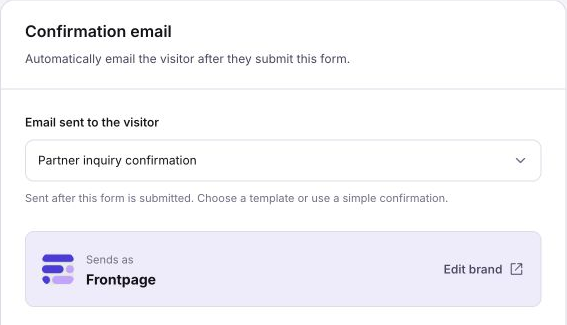
A contact form submission belongs with the form. You can review the saved message, then check the notification settings for that form. The screenshot shows a separate option for the confirmation that goes to the visitor. Set up notifications and test a form submission before you start sending customers to the page.
Use the feature that matches the request
A signup for future updates belongs in a mailing list form. Use wording that says what people are signing up for. A visitor who wants to speak to someone can use a tap-to-call bar on a phone. You can collect and manage mailing list signups or give mobile visitors a direct way to call. Each feature has its own setup and test.
Frequently asked questions
What is a Frontpage module?
It is a working website feature, such as a contact form or mailing list signup, that the Agent can add to a page.
Can I use two forms on one website?
Yes. Ask for each form where it belongs, then check the settings and saved submissions separately.
What do I check before making a form public?
Check the requested fields, the phone layout, the notification settings, and the message visitors see after they send it.
Is adding a form enough to connect an outside service?
Some features need separate setup. Check the current workspace settings for the feature you chose.