
How to give your AI Support Agent help or take over a conversation
Give the agent a missing fact or take over and reply yourself. Choose who handles the conversation from the same workspace.
A customer asks whether their order can still arrive before a Saturday event. Your standard delivery policy can’t answer that. If your team has a confirmed update, you can give the agent the facts or take over and reply directly.
Before you start
Set up and enable AI Support Agent on the correct site. Every plan includes it, with usage based on your plan’s AI and email allowances. A site admin manages setup and settings. Use an editor or admin account to handle a conversation.
For a test, use a conversation you started on a test site. Keep order numbers and private delivery details out of any public example.
1. Check where requests for help go
Open AI Support Agent → Your agent and find Owner help. A site admin can check the Private guidance email and the situations that can bring your team in, such as when the agent has no reliable answer or a customer asks for a human. Save any changes before leaving the tab.
Use a mailbox your team checks. If someone replies by email to a request for guidance, they should send from the configured address. You can also give guidance directly from the conversation in Frontpage.
2. Open the conversation and choose what to send
Under Conversations, open the customer’s thread. Use Needs attention if you’re looking for conversations that need help. Read the latest messages and check who is handling the conversation before you type.
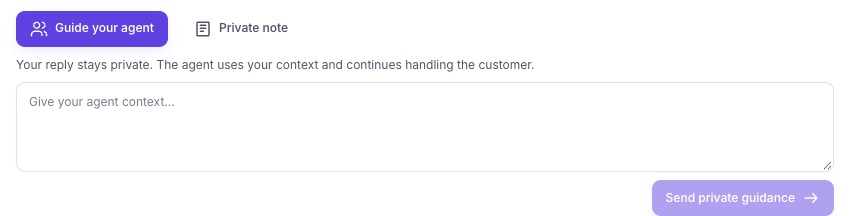
- Guide your agentPrivately give the agent a fact it can use.
- Private noteLeave an internal record for your team.
- Reply to customerTake over first, then send a customer-facing reply.
Guide your agent gives the agent information while it keeps handling the conversation. For the delivery question, you might write “Our dispatch team confirmed the order hasn’t shipped. Offer pickup on Friday after 3 p.m.” Choose Send private guidance. The customer sees the agent’s reply through the original channel.
Use Private note and Save private note for a team record such as “Dispatch is checking whether pickup is possible.” A note stays private and leaves the current handler in place.
3. Take over and reply yourself
Select Take over at the top of the thread. Check that you’re handling the conversation, then choose Reply to customer. Write your reply in that composer and select Send to customer.
Read the message before sending. Use the facts you’ve confirmed, offer a clear next step, and follow your business’s identity checks before sharing private order details. Taking over does not turn a draft note or private guidance into a customer reply.
4. Return the conversation to the agent
If you took over the thread and want the agent to handle what comes next, select Return to agent. Check that the conversation shows Agent handling. Leave it with your team if you still need to make a decision or personally follow up.
In a test thread, check both views. Your private note or guidance should appear only in your workspace. The customer-facing reply should appear in the test chat or email thread.
Common problems
- The team didn’t receive the request for help. Check the private guidance address, the relevant Owner help setting, and the mailbox’s spam folder. You can still review the thread in Frontpage.
- You don’t see Reply to customer. Check your site role and the current handler. Use Take over before sending a direct reply.
- The agent pauses for usage. Check the notice and your site’s AI allowance. Your team can still handle conversations manually. Email replies also use the site’s email allowance.
Frequently asked questions
What is the difference between guiding AI Support Agent and taking over?
Guidance gives the agent private facts while it keeps handling the conversation. Take over when you want to handle the thread and send the customer reply yourself.
Does the customer see my private guidance or internal note?
No. Use the private guidance or note control for information only your team or the agent should see. Use the customer reply control for the message you want the customer to receive.
Can I return a conversation to AI Support Agent after replying?
Yes. Use the return control on the conversation when your team is ready for the agent to handle it again.