
How to add knowledge and enable automatic learning
Add the facts customers need, choose what your agent can learn, and check its saved knowledge.
Give your AI Support Agent clear business facts so it can answer questions about your services, delivery, returns, and opening hours. With learning enabled, it can also save reusable facts from your team’s private guidance and approved webpages.
This guide uses a shop with a simple delivery policy: standard delivery takes 3 to 5 business days after dispatch. That policy can help answer a general delivery question. It does not give the agent live carrier tracking or a guaranteed arrival date.
Before you start
AI Support Agent is available on every plan, including Free. A site admin completes setup before adding knowledge. Open the correct website in your workspace, then go to Customers → AI Support Agent. Use an administrator account for this walkthrough. If you have not activated support or set up a test conversation, start with the setup guide.
Prepare facts your business has confirmed. Keep individual customer details, passwords, and private account records out of shared business knowledge. Saved support knowledge is internal; it does not publish an article or change your website.
1. Save a useful knowledge note
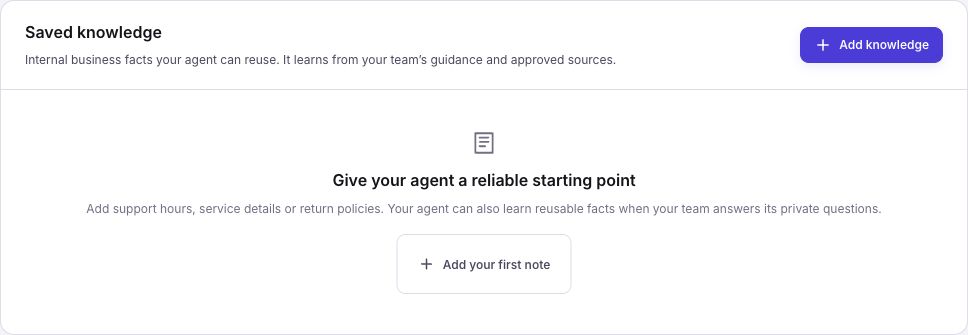
Open Knowledge. In Saved knowledge, choose Add knowledge. Enter a clear Title, such as “Standard delivery,” and put the policy in Knowledge:
Standard delivery takes 3 to 5 business days after dispatch. This is an estimate, not a guaranteed arrival date. If an order is late or the customer needs an exception, ask our team to check.
Choose Save knowledge. Return to All knowledge and open the note again. Check that the title and full policy match what you saved. Use separate notes for topics such as returns and support hours so you can update them clearly.
2. Enable the knowledge permissions
Open Your agent. Under Agent permissions, check Read business knowledge. To allow automatic learning, enable Keep business knowledge up to date and save your changes.
Learning also needs Let the agent handle conversations enabled. If you want the agent to ask your team about missing facts, keep Ask you for help enabled and check the Private guidance email under Owner help.
Reading and learning are separate. The agent can use an existing note without changing it. Turning on learning does not let customers rewrite your policies, and it does not give the support agent permission to edit public website pages.
3. Choose website search or an approved source
Return to Knowledge. Website search lets the agent read your live public pages when needed. The switch is labeled Search your public website. It does not read signed-in pages or save a full copy of your site. The switch saves directly; check for any error before leaving.
Use Approved sources when you want to save a specific policy page as a reference. Choose Add webpage, enter its public HTTPS address under Webpage address, and choose Add webpage to save it. The page must be available without signing in.
If you want to supply the text yourself, open Use an approved excerpt instead, paste the approved wording, and choose Save excerpt. The address stays as a reference; Frontpage does not treat your pasted text as a fresh website fetch.
Check the saved text and the learning status. It may show Learning queued, Learning in progress, or Learning complete. Learning can take time. An approved source remains a saved snapshot, so use Refresh webpage after changing its public policy. The agent can also refresh an older snapshot when it reads it.
4. Give private guidance with a reusable rule
In an authorized test conversation, ask about a product with no confirmed restock date. If the agent needs your team’s input, open the conversation and use Guidance, or reply through the configured private guidance email.
For example, your team can give this rule:
When we do not have a confirmed restock date, say so and ask our team to check. Do not promise a date or say that the customer has joined a restock alert.
This is a rule the business can reuse. A one-off exception for a specific customer or order belongs in that conversation or the customer’s private notes, rather than shared policy. Customer messages alone cannot authorize shared knowledge changes.
Private guidance is not sent directly to the customer and does not take over the conversation. Check the customer-facing answer separately. The agent can then learn any useful, reusable policy from the authorized guidance. It may update an existing note, create one, or make no change when there is no new policy to save.
5. Review and protect saved knowledge
Open Knowledge again and inspect the relevant note. Check its current text and revision history. Earlier revisions show what changed; use the history controls to read an available revision before restoring it as a new revision.
For a policy you want to maintain yourself, open the note, enable Lock against agent updates, and choose Save knowledge. A locked note can still supply answers. The agent cannot edit or unlock it. An authorized human must manage the lock.
Archive note stops future use without deleting the note and its history. Disabling an approved source stops future source use and learning, but does not remove knowledge already learned from it. Review those notes separately. A task already in progress can still hold text it read earlier.
Check the result
Ask a general delivery question in your test conversation. Check that the answer uses the 3 to 5 business day estimate, does not invent tracking information, and asks the team when a decision is needed. Then confirm that your saved policy and any learned rule remain accurate.
Common problems
- The agent is not learning: check that support is active, conversation handling and knowledge updates are enabled, and the site has AI credit available. Check the source’s learning status for a pause or a request for attention.
- A source has old wording: use Refresh webpage, inspect the new snapshot, and review any saved notes that still contain the old rule.
- A note did not change: check whether it is locked. Learning also does not require a new revision when guidance contains no reusable change.
- An answer uses the wrong policy: inspect the note, approved source, and public page for conflicting facts. Correct the source of the mistake and test a new question.
Frequently asked questions
Can AI Support Agent learn from my team’s answers?
Yes, when the relevant learning permission is enabled. Give it a confirmed fact it can reuse, such as a delivery policy, and review what it saves in Knowledge.
Can I stop AI Support Agent from changing a policy I’ve approved?
Use the protection controls on saved knowledge you want to keep fixed. Review the note after giving the agent new guidance on the same topic.
Should customer order details go into shared support knowledge?
No. Keep shared knowledge for facts that apply across conversations. Leave individual order details in the private customer record or conversation.