
Printify: Sell products from your connected shop
Sell eligible items from an existing Printify shop through your Frontpage Store.
An illustrator already sells a printed shirt through Printify. To offer it on their own website, they can connect the shop that has the shirt and review the imported product in Frontpage. Customers see the storefront and checkout on the website. Printify produces and ships eligible paid items after Frontpage forwards the order.
Bring over the shop you already use
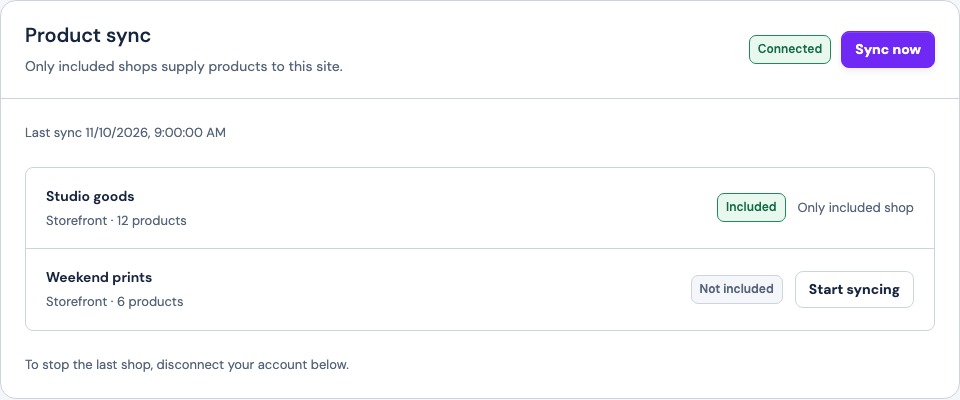
Choose the correct shop in the Printify integration. A shop that also sells on another channel can still supply products. Check the product photos, price, size options, and availability after sync. Follow the Printify setup and shop selection steps to confirm the connection before you add the products to a page.
Give customers a place to buy
Show the shirt on your storefront and review what the product page and cart show. Check the selected size, total, and shipping before opening sales. Set up the store’s product pages and checkout so visitors can see what they are buying.
Follow payment and fulfillment separately
Frontpage takes the customer’s payment through the Store checkout. Eligible paid Printify items go to Printify to be produced and shipped. Printify charges the merchant for its services. If the order needs attention, compare the Frontpage order and the matching Printify order before taking another action. Check how customers pay through Frontpage if payment setup is still pending.
Frequently asked questions
Do I need a new Printify shop for Frontpage?
You can choose an existing shop that already has the products you want to sell.
Who prints and ships the shirt?
Printify and its print providers handle production and shipping for eligible items forwarded to Printify.
Can I check an imported item before selling it?
Yes. Review its photos, price, variants, availability, and checkout details in Frontpage first.
Does connecting Printify replace my other sales channel?
It does not close the other channel. Check which shop is syncing and manage its listings in the appropriate channel.