
Autopilot: Automatically improve your website
Choose a goal and let Autopilot test eligible website improvements, then review the activity to see what happened.
A service business wants customers to find the quote form more easily. It could choose a tracked enquiry goal and let Autopilot test a different version of an eligible page. The owner can review the proposal and result in the activity record.
Choose what the test measures
A form submission, an order, and a click mean different things. Choose the action that matches the business outcome you care about, and check that the site records that action. Make sure the published site uses a connected custom domain before enabling Autopilot.
See the change and the result
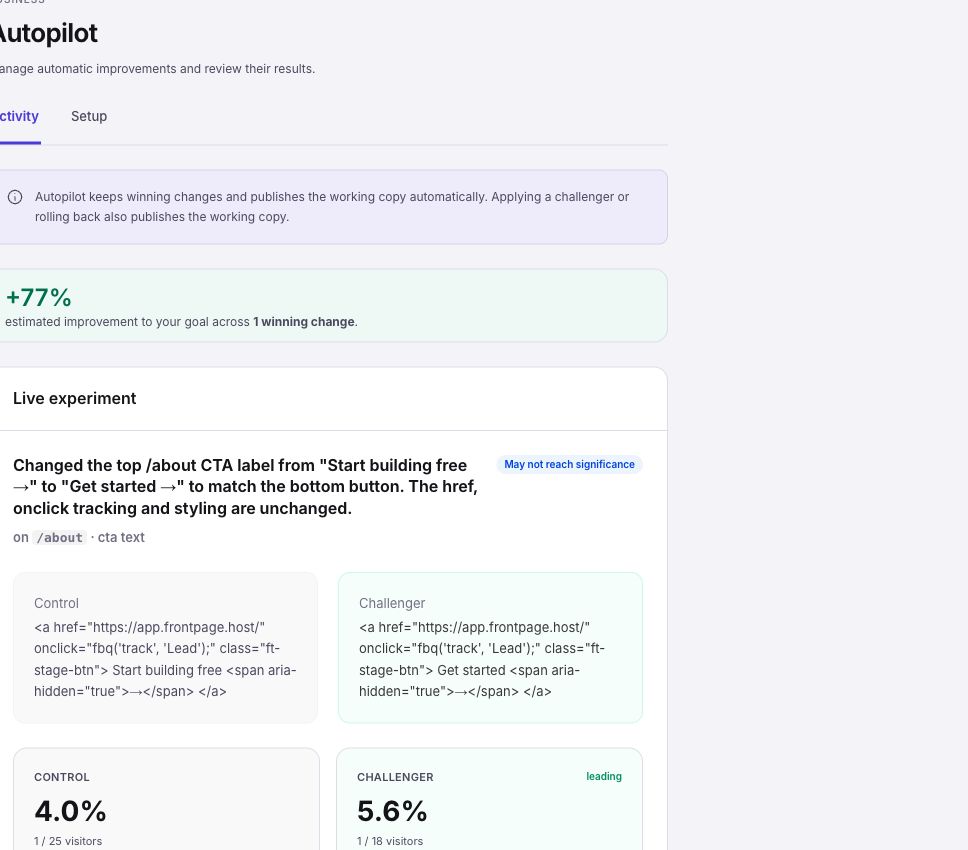
Autopilot can compare versions for eligible live traffic. When an experiment concludes, inspect the record to see whether it found a winner and which version became the default. Small samples can produce inconclusive results. Check the goal, dates, and change together before drawing a business conclusion.
Keep control of the site
Use custom instructions to describe what should stay the same. Pause when you want to stop new tests, and check any running experiment separately. Scale and eligible Enterprise sites can use Autopilot, and activity is subject to usage limits. Set up Autopilot and check the first test when you are ready. If you want to decide on each idea first, review suggestions in Growth Advisor.
Frequently asked questions
Do I need a connected domain?
Yes. Start with a published site on a connected custom domain.
Does every experiment produce a winning version?
No. A test can finish without enough evidence to choose a winner.
Can I review what Autopilot changed?
Yes. Check the activity and experiment records for the change, status, and available result.
Can I pause during a busy season?
Yes. Pause stops new tests. Check any running experiment separately.