
Routines: Schedule repeat work for your website agent
Give the Frontpage Agent a repeat task, choose when it runs, and review what it found.
Every Monday, a shop owner wants to know which pages people visited and how many orders came in. The owner can ask once for a summary of the past seven days, then save that request as a weekly routine.
Give the Agent one repeat task
Pick a job you already do on a schedule. It could be a review of the last seven days of website traffic or a draft for a monthly update. Give the Agent a date range, the data to check, and the format you want back.
Example prompt
Each Monday, summarize last week’s visitors, most visited page, and store orders if available. Suggest one thing to check next. Report back in this conversation. Leave the website and customer records as they are.
- Save the taskAsk for a weekly traffic and sales summary.
- Set a scheduleChoose Monday and your time zone.
- Review the reportCheck figures and suggested next steps.
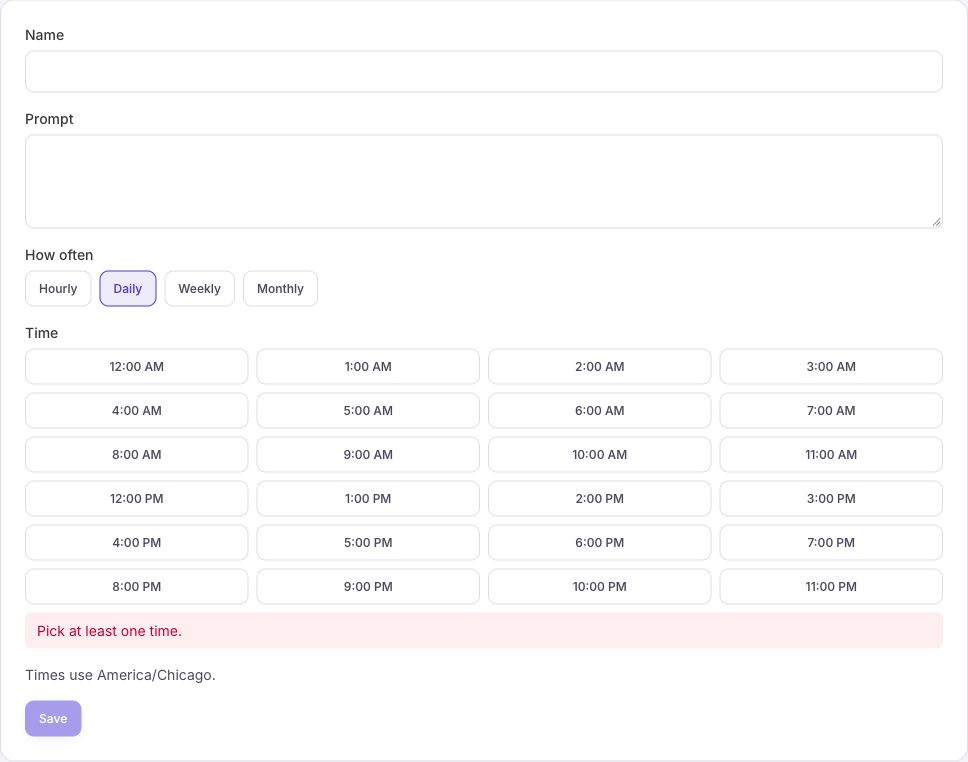
Choose when it starts
Set a day and time and check the time zone on the routine. You can also use an hourly, daily, or monthly schedule. A scheduled time tells Frontpage when to start the work. Check the result after the task has had time to run.
Use Run to try the saved request once. Check the result in your Agent conversation or prompt history. A history entry can show the task started before a result is ready.
Review the result and adjust
For the shop example, look for the time period, traffic figures, and any orders the Agent could read. Ask it to say when a number is unavailable. If you want to act on a suggestion, ask the Agent to plan a specific change and review the website draft before publishing.
Use Pause if you want to stop future starts. Edit the saved prompt as your needs change, or resume it later. A task that already started can still finish.
Set up your first routine
Every Frontpage plan includes Routines. A site admin or editor can save up to 3 on Free, 5 on Starter, 10 on Growth, or 15 on Scale. Check the routine limits by plan if you need more. Paused routines count toward the limit. Runs use the site’s AI budget. Follow the guide to save a schedule and check your first run.
Frequently asked questions
What is a good first Frontpage routine?
Ask for a weekly summary of site traffic with one next step. Use a clear date range, tell it where to report, and keep the first task read-only.
Does a routine send me an email every time it runs?
No. Specify the result you want and where it should appear. Check the Agent conversation or prompt history for the result of a routine.
Can one routine run on several days each week?
Yes. A weekly routine can have multiple days and times. For example, Monday and Thursday at 8 a.m. still counts as one saved routine.
Which plans include Routines?
Every Frontpage plan includes Routines. Site admins and editors can manage them. The number you can save depends on your plan.