
How to send form enquiries to HubSpot
Connect HubSpot to one Frontpage form and verify that a new enquiry creates a contact.
Use a Frontpage site admin account and access to manage Service Keys in the correct HubSpot account. Start with one form that collects a name and email. The example below uses a website quote request and an email address you control.
1. Create a scoped HubSpot Service Key
In HubSpot, open Development → Keys → Service Keys. Create a key and add the crm.objects.contacts.write scope. Copy the key from HubSpot and keep it private. HubSpot has retired creation of legacy private apps. An existing legacy token with the required scope can still work. Read the HubSpot Service Keys guide if you cannot find the current settings.
2. Connect the correct Frontpage site
Open Contact & lead forms → Destinations → Connect HubSpot. Paste the key into HubSpot access token, choose Connect, and look for Connected. Use the connection field for the key. Check how Frontpage stores and uses CRM destinations before you enable copies.
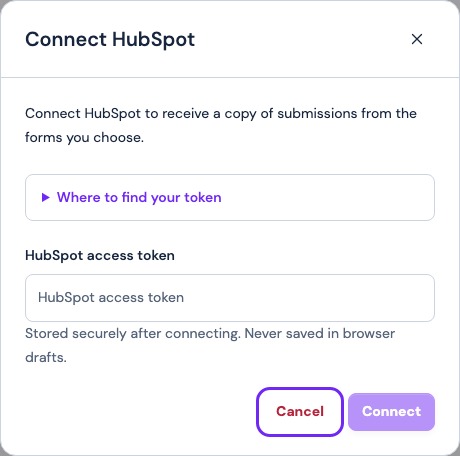
3. Enable copies for the chosen form
Open the quote request form and find Also send a copy. Turn on HubSpot. Frontpage uses recognized name and contact fields and can send fields such as company or website when the form provides them in a recognized format. This action creates a contact. Keep the full request message in Frontpage for reference.
4. Check the saved message and HubSpot contact
Send a clearly marked test from the public form. Use a fresh test email you control so you can identify the contact. Confirm that the form inbox saved the enquiry, look for the last copy result in its settings, and search HubSpot Contacts for the address. Check the name and any expected phone or company value.
If the copy fails, check the key scope and HubSpot account. If the address already exists, inspect its record and the copy error before sending again. To turn it off, use the form switch. To remove the connection site-wide, use Destinations. See how the provider copies fit into the wider form workflow.
Frequently asked questions
Which HubSpot scope does Frontpage need?
The connection uses crm.objects.contacts.write to create contact records.
Will HubSpot get a new deal from each enquiry?
This connection sends a contact. The saved Frontpage message remains available with the full enquiry.
Why can I not see Service Keys?
Check the HubSpot account and ask its admin whether you have the required developer access.
Can I test with an email address already in Contacts?
Use a fresh address you control for the first test. A duplicate response is not proof that a new contact was created.