
How to send form enquiries to Privyr
Send a copy of a Frontpage form enquiry to Privyr using the account’s Incoming Webhook URL.
Use a Frontpage site admin account and access to the correct Privyr account. Choose a form that captures details your team can use to follow up. This walkthrough uses a callback request with a name, email, phone, and message.
1. Copy the incoming lead URL
In Privyr’s web app, open Automations → Lead Sources, find Webhooks, and open Incoming Webhook. Copy the box labeled Privyr Webhook URL. Frontpage needs the full incoming leads address that starts with https://www.privyr.com/api/v1/incoming-leads/. Use the Incoming Webhook option because it receives new leads into Privyr. Treat the full address like a secret. See Privyr’s custom lead source guide for how incoming leads appear in the app.
2. Connect the destination on the right site
Open Contact & lead forms → Destinations → Connect Privyr. Paste the full address into Privyr Webhook URL and choose Connect. Check for Connected. Check how Frontpage handles CRM connections before you route any live form.
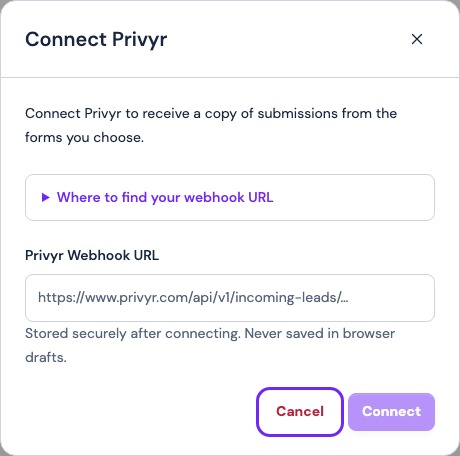
3. Enable Privyr for the callback form
Open the callback form under Forms. Turn on Privyr under Also send a copy. Frontpage sends mapped name, email, and phone values when present. It can include other submitted fields with the lead. Check the actual result if the callback details are essential to your team.
4. Submit and locate one test
Send a marked enquiry with contact details you control. Confirm the saved message in Frontpage. In Privyr, check the client list for the new lead and open its details to review the message. A Privyr app or email alert depends on your notification settings there.
If Frontpage rejects the URL, check that you copied the full incoming lead address from the right account. Use Replace URL after a credential change. Turn off Privyr on an individual form to stop its copies. Review how copying forms to a CRM affects the saved original.
Frequently asked questions
Does Frontpage need a separate Privyr authentication token?
The Frontpage connection field takes the full Privyr Incoming Webhook URL.
Can I tell which form sent a lead?
Check the source shown in Privyr and compare the details with the saved submission in the selected Frontpage form.
Will Privyr always notify me about a new lead?
Check Privyr’s own notification settings. Verify the lead in the client list even if no alert arrives.
Does removing Privyr delete old enquiries?
No. It stops future copies through that connection. The existing Frontpage messages remain.