
Usage and plan: See your allowances and choose the right plan
See your site's plan and usage in one place, and check what will change before switching plans.
See what your site is using
Open Usage & plan to see the site's plan and its AI budget. Storage and team seats show what is in use now. Monthly counters, including email sends where applicable, show what the site has used in the current month.
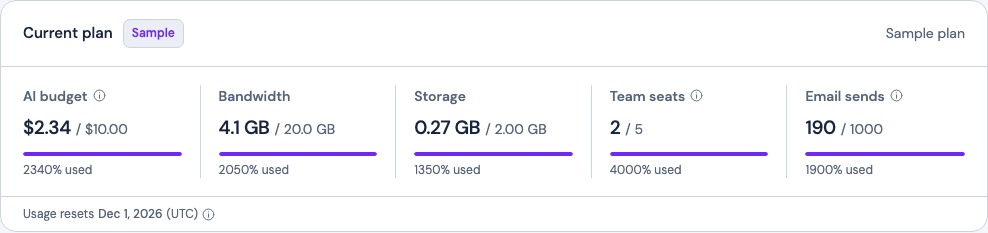
Choose a plan around the work you do
If you want to bring another person onto a site, check how team seats and invitations work. If you send regular customer updates, check your email sending limits. Use those needs to compare the current Frontpage plans, then review the change in your workspace before confirming.
Frequently asked questions
Where can I see which Frontpage plan my site uses?
Open Usage & plan from the site workspace. If you manage several sites, first switch to the one you want to check.
Does every Frontpage plan show the same usage cards?
No. The cards depend on the site and plan. For example, Email sends appears when that allowance applies.
Is my monthly reset the same as my billing renewal?
Not necessarily. Monthly usage counters reset at the start of the month in UTC. Check your subscription separately for its renewal date.
Does looking at another plan change my subscription?
No. Review the plan details and complete the confirmation or checkout to make a change.