
Email campaigns: Send updates to your customers
Give customers a reason to come back. Write an email, choose who gets it, and review it before sending.
A weekend sale. A product back in stock. A new service your customers have asked for. You have something useful to share, and you want the right people to hear about it.
Frontpage email campaigns let you write a branded message, choose customers, and send it from the same workspace as your website and People CRM. Give readers a clear reason to visit, buy, or get in touch.
Friday through Sunday. Find your next everyday bag.
20% off backpacks
this weekend
Pick a bag for work, weekends, and everything you carry.
Send news people can act on
Imagine your shop is running a backpack sale from Friday through Sunday. Instead of hoping customers notice a website change, send a short email with the offer, the dates, and a button to the right product page.
A campaign is one message you send once to a chosen audience. Use it for new stock, a seasonal offer, a useful reminder, or a business update. A contractor could tell past customers about a new service. An accountant could share a short checklist before a filing deadline.
Keep the message useful and specific. Say what changed, why it matters, and what the customer can do next. You can create an ongoing follow-up separately with email series.
Choose exactly who receives it
Use the people already in your workspace. Search by name or email, sort by newest added, and use source and availability filters to find the right contacts. Check individual people and confirm your selection, or choose a saved group or stage. You can also list individual email addresses.
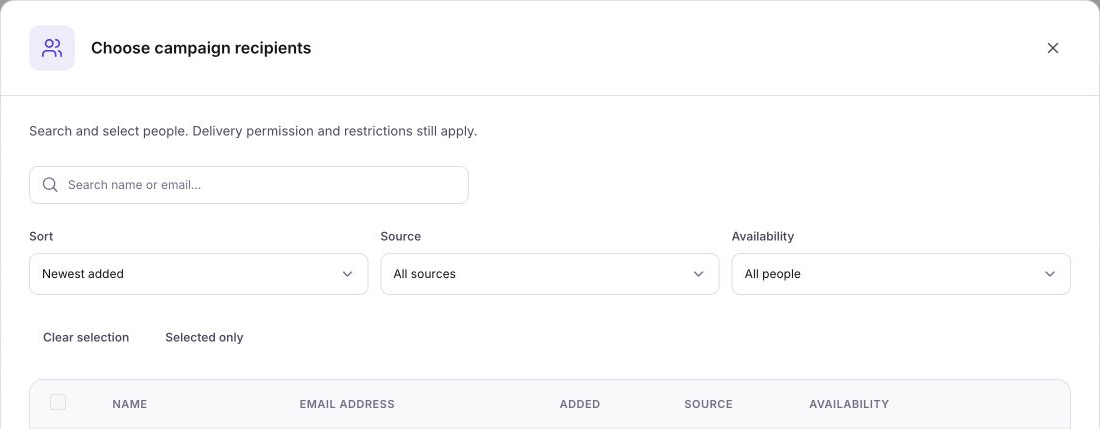
For the backpack sale, choose customers who should receive shop updates. Review the eligible count before sending. Saved unsubscribes, missing email permission, and delivery restrictions remain in effect, so a contact's presence in People CRM does not override their email settings.
Save the campaign to keep its recipient selection. Come back later and continue from the saved audience instead of rebuilding the list.
Build an email that looks like your business
Write the required subject and preview text, then edit the email directly in its preview. Add headings, paragraphs, images, lists, dividers, and buttons. Give the reader one clear next step, such as “Shop backpacks” or “View our new service.”
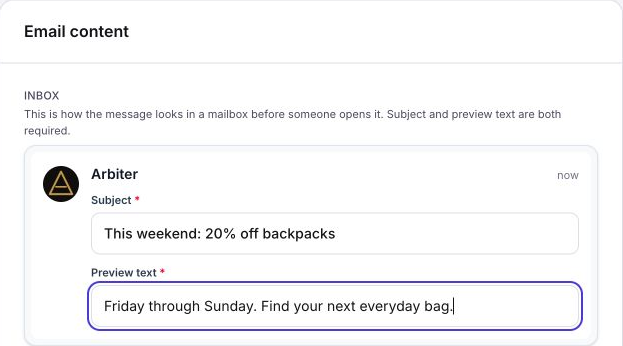
Start from a saved template when you already have an email you want to reuse. Create a campaign from that template, then adjust the message and choose its recipients. You can keep a consistent look without writing every email from scratch.
The Sender card keeps your From name, reply address, and business address visible while you work. Check them so customers recognize the business and replies reach the right place.
Save your work and test before sending
Save campaign keeps your email and audience without sending to customers. You can prepare the weekend offer ahead of time, leave, and reopen the saved campaign when you are ready.
Save campaign
Keep the email and recipients for later.
Test to myself
Check a copy in your own inbox.
Review & send
Check the final details before queueing.
Use Test to myself to send a copy to the signed-in account email shown in the editor. Open it on your phone, check the images, and follow the links. The test does not send to your selected audience.
When it looks right, choose Review & send. Check the sender, message, eligible recipients, and any warnings. The final confirmation shows the send action and recipient count. Recipients are checked again before the campaign is accepted.
Check delivery after sending
Frontpage queues campaign deliveries in the background. Open the campaign status and Sent to see the message records and their delivery status. If an address is skipped or a message fails, inspect its reason before deciding what to do next.
Once a campaign starts, its recipients are fixed. Later changes to a group do not add more people to that send. Keep the campaign record as the place to check progress.
Frequently asked questions
When should I use a campaign instead of an email series?
Use a campaign for one message, such as a sale announcement. Use a series for messages that go out in order after someone enrolls.
Can I choose just one group of customers for a campaign?
Yes. Select the audience you need and review who is eligible. Existing unsubscribes and delivery restrictions still apply.
Can I see the email before sending it to everyone?
Yes. Save the campaign and send a test to yourself. Check the message and its links before you review and send it to the audience.