
How to manage site preferences
Check your site details, choose the model for its next build, and manage usage alerts from Site preferences.
Open Site preferences
In the workspace, check the site name in the site switcher. Under Site settings, choose Site preferences. You need site admin access to manage these settings. General shows the Frontpage address and current plan. If you work on more than one website, check the address before changing anything.
Choose when the change takes effect
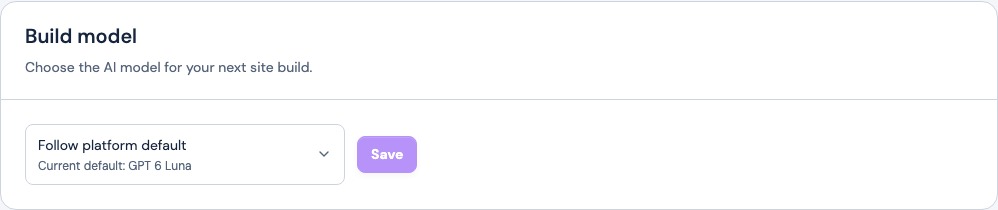
- Build model: Choose an available model or Follow platform default, then select Save. Look for the confirmation that your next build will use the model. This does not start a build or change the live site by itself.
- Notifications: Change Usage & limit alerts. The switch saves when you change it. Reopen the page to check the setting. Use the site’s usage and plan page to see the limits themselves.
- Subdomain visibility: If your site has no custom domain connected, this switch controls who can open the Frontpage staging address. Public lets anyone open the staging build and allows search engines to index it. Private limits access to your team. When you connect a custom domain, the Frontpage subdomain stays private.

Find the right settings for other changes
Use Brand & styles for the business name and logo. Use Domains to connect your website address, and go to Account settings for your own contact details. Site preferences also contains controls to erase site analytics or manage the site itself. Use those only when you intend the action shown.
Frequently asked questions
Who can change Site preferences?
Site admins can manage this page. Some actions, such as ownership transfer, also require the site owner.
Does changing the build model start a new build?
No. Save the model choice and it applies to the next build.
Do I need to publish after switching usage alerts?
No. The switch saves the preference for this site as you change it.
Why can I not see Subdomain visibility?
The setting appears when the site has no custom domain connected. With a custom domain connected, the Frontpage subdomain stays private.